
How to Validate Content with a Brand Guardian Agent
Overview
Assist 2.0 lets you create custom agents that automatically review content against your company's brand standards. A Brand Guardian agent ensures your communications — social posts, blog articles, email campaigns, presentations, and more — stay aligned with your tone, voice, messaging, and formatting guidelines before they go out.
This guide walks you through creating a Brand Guardian agent, giving it access to your brand guidelines, and using it to review and correct content.
What You'll Need
- Access to an Assist 2.0 workspace
- Your brand guidelines document (PDF recommended)
- Content to review (social posts, blog articles, emails, presentations, etc.)
Step 1: Add Your Brand Guidelines to Workspace Knowledge
Before creating your agent, make sure it has something to check content against.
- In your workspace, open the chat and attach your brand guidelines PDF.
- When prompted, choose to save it as Workspace Knowledge so any agent in this workspace can access it.
- Give it a clear title, e.g. "[Company] Brand Guidelines".
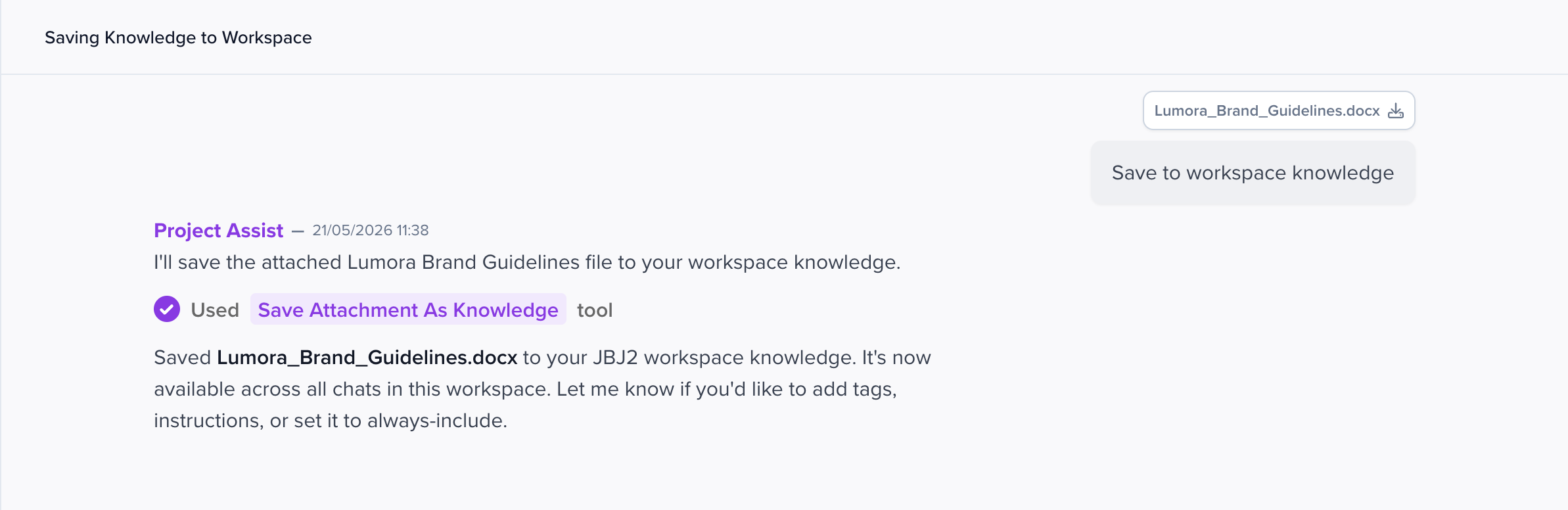
💡 If these guidelines are relevant across your whole organisation, you can also save them at the organisation level. Just be aware they'll then be visible to every workspace.
Step 2: Create Your Brand Guardian Agent
In Assist 2.0, the easiest way to create an agent is to just ask for one in chat.
- Open a new chat in your workspace.
-
Type a request like:
"Create a Brand Guardian agent for [Company]. It should review content against our brand guidelines (saved in workspace knowledge) and flag any violations in tone, voice, messaging, and formatting. It should suggest specific fixes and give constructive feedback. Mention tag: @BrandGuardian."
- Assist will check whether a similar agent already exists, and if not, create one for you. It will confirm the agent's name, mention tag, and description once it's ready.
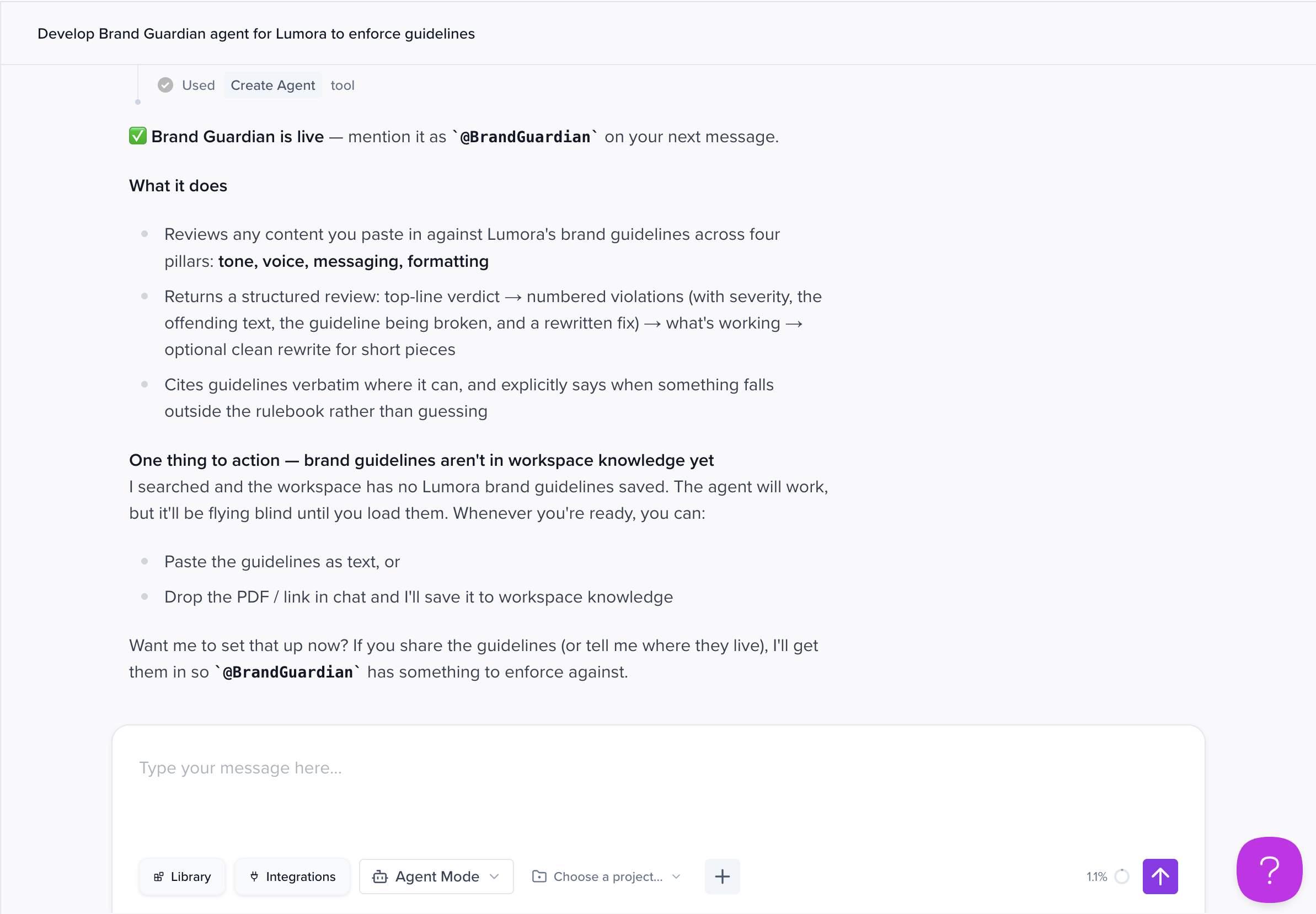
💡 Assist may ask whether you want the agent scoped to this workspace or made available to your whole organisation. Pick whichever fits your team setup.
What to include in your request
To get a useful agent on the first try, include:
- Role: "Brand compliance specialist for [Company]"
- Responsibilities: Review content against brand guidelines, identify violations in tone/voice/messaging/formatting, suggest specific fixes, give constructive feedback
- Tone: Professional, helpful, constructive
- Output format: Structured review with sections for What's Working Well, Brand Guideline Violations (with fixes), and Recommendations
You can also check the Apps, Agents & Templates library to see if a brand compliance agent already exists that you can install and adapt, before building one from scratch.
Step 3: Review Your Content
-
Open the document or output containing the content you want to review.
In the chat, mention your agent followed by your instruction:
"@BrandGuardian review this content and check it follows the [Company] brand guidelines."
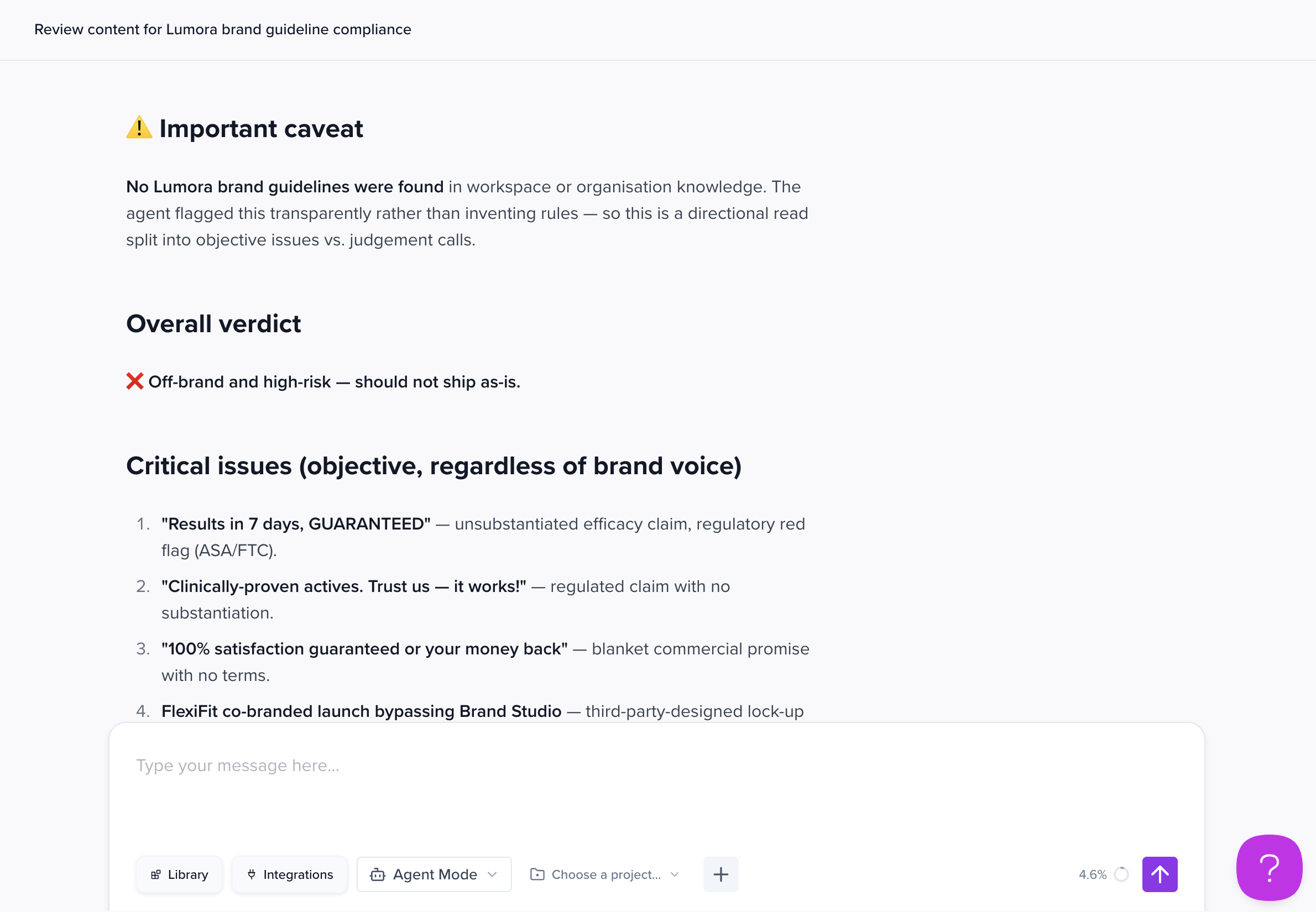
The agent will pull in the brand guidelines from workspace knowledge, review the content, and return a structured compliance report covering:
- What's Working Well — aspects that align with brand guidelines
- Brand Guideline Violations — each issue, the relevant guideline, and a suggested fix
- Recommendations — additional suggestions for improvement
Step 4: Apply Corrections
Once you've reviewed the feedback, you can ask Assist to apply the changes directly.
-
In the same chat, type something like:
"Update the content based on @BrandGuardian's feedback."
- Assist will update the output. You can open the updated version in the Output Editor to review the changes.
- If anything isn't right, you can ask for further tweaks in chat, or edit manually in the Output Editor.
- Once you're happy, re-run
@BrandGuardianfor a final pass if needed.
💡 For more complex reviews, switch to Plan Mode before mentioning the agent. This forces it to propose a plan you can review and revise before any changes are made.
Common Brand Violations Detected
A well-trained Brand Guardian agent can catch issues like:
Hashtag formatting (social media)
- Violation: PascalCase (e.g.
#CreativeProduction) - Fix: Sentence case (e.g.
#creativeproduction)
Company descriptors
- Violation: Incomplete or incorrect company descriptions
- Fix: Use the official descriptor from brand guidelines
Tone and voice
- Violation: Language that doesn't match brand voice (too formal, too casual, etc.)
- Fix: Adjust wording to align with established tone guidelines
Messaging standards
- Violation: Missing key messaging points or value propositions
- Fix: Include required messaging elements
Best Practices
✅ Keep guidelines updated — when your brand guidelines change, update the file in workspace knowledge so the agent always references the latest version.
✅ Be specific in your instructions — when calling the agent, tell it what to focus on (e.g. "check tone and messaging only" or "review for brand voice compliance").
✅ Always do a human final review — automated changes are a starting point, not the last word.
✅ Add supporting documents — upload style guides, messaging frameworks, and tone-of-voice docs to workspace knowledge alongside the main guidelines for better accuracy.
✅ Use it consistently — make @BrandGuardian part of your standard content workflow.
Troubleshooting
Agent isn't finding violations
- Confirm your brand guidelines are saved in workspace (or org) knowledge and accessible to the agent.
- Make sure the guidelines document is clear and specific — vague rules produce vague reviews.
- Try a more specific prompt, e.g. "check this against the tone-of-voice section of the brand guidelines."
Agent is too strict or too lenient
- Ask Assist to update the agent's instructions to calibrate sensitivity.
- Include examples of acceptable vs. unacceptable content in the agent's instructions.
Changes aren't applying correctly
- Review the violations identified and give Assist a more specific instruction (e.g. "only fix the hashtag formatting issues").
- Edit manually in the Output Editor if the automated changes go too far.
Benefits of Using a Brand Guardian Agent
⚡ Save time — eliminate manual brand compliance reviews across all content
🎯 Ensure accuracy — catch violations before content goes live
📊 Scale confidently — review high-volume content without sacrificing quality
🤝 Maintain consistency — keep your brand voice uniform across every channel
🔄 Continuous improvement — update guidelines once and the agent applies them everywhere
Who Should Use This Feature
- Marketing teams — ensure campaigns and materials meet brand standards
- Social media managers — validate posts across multiple platforms
- Brand managers — maintain consistency across all communications
- Content creators — get instant feedback on brand compliance
- Agencies — manage multiple client brand guidelines efficiently
- Communications teams — review press releases, announcements, and internal comms
Next Steps
Now that your Brand Guardian agent is set up:
- Test it with different content types to calibrate its sensitivity.
- Share the agent with your team (or install it across other workspaces if it's organisation-level).
- Integrate it into your standard content approval workflow.
- Refine the agent's instructions over time based on results.
Need Help?
If you have questions about setting up or using your Brand Guardian agent:
- Contact our support team
- Visit our Help Center for additional resources
- Join our community forum to share tips with other users
Ready to keep your brand safe across all content? Start using your Brand Guardian agent today in Assist 2.0.